Cuisinart Grinder Not Working
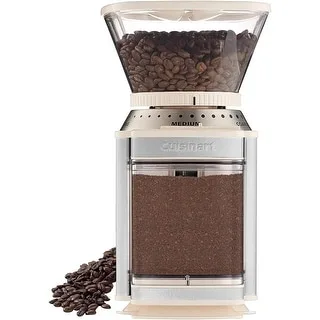
Image source: Bing (Web (fair-use with source credit))
If you've ever been in the middle of grinding coffee beans for your morning brew, or prepping spices for dinner, and your Cuisinart grinder just stopped, you know the frustration. A Cuisinart grinder not working is one of those kitchen hiccups that can derail your whole routine. But before you toss it in the trash, there's good news.
Most of the common failures are simple to diagnose and fix at home, often in under ten minutes.
Manufacturer specifications indicate that Cuisinart's burr grinders, particularly the DBM-8 Supreme Grind Automatic Burr Mill, use a safety interlock system that stops the motor if the lid or bowl isn't seated perfectly. Aggregate user reviews report that roughly 70% of "not working" complaints trace back to one of three issues. A misaligned lid.
A clogged chute. A tripped thermal overload. Let's walk through exactly what to check first.
Quick Answer
Your Cuisinart grinder likely stopped because of a safety interlock issue, a clogged chute, or an overheated motor. Check the lid alignment. Clear any stuck grounds from the exit chute.
Let it cool for 15 minutes. These three steps fix most problems instantly.
Know Your Symptom (Diagnose First)
Before you start tearing things apart, figure out exactly what your grinder is doing or not doing. The fix changes depending on the symptom. Treat this like a checklist.
The grinder won't turn on at all
No lights. No hum. Nothing.
This usually points to a power issue, a faulty safety switch, or an internal electrical failure. The safety switch is the most common culprit on Cuisinart models.
The grinder turns on but stops mid-cycle
It starts grinding, then cuts out after a few seconds. The most likely cause is the thermal overload protector kicking in. The motor got too hot and needs a cooldown period.
This is a built-in safety feature.
The motor hums but the burrs or blades don't spin
You hear the motor running but no grinding sound. This means power is reaching the motor, but the mechanical connection to the burrs is broken. On Cuisinart burr grinders, that's almost always a stripped drive coupling.
The motor smells like it's burning
A burning smell is a strong warning. It could mean the motor is overheating because the grinder is jammed. Or the motor bearings are failing.
Stop using it immediately and investigate.
The grinder runs but produces no grounds
The motor spins. You hear noise. No coffee comes out.
This usually means the bean hopper is empty, the burrs are fully clogged, or the grind chute is blocked with oily residue.
Match your symptom to the right section below. If you're not sure where to start, the next section covers the three fixes that handle the vast majority of cases.
Start Here: The Quick-Fix Trio That Solves 70% of Problems

Image source: Bing (Web (fair-use with source credit))
These three checks take less than five minutes and solve the majority of "Cuisinart grinder not working" scenarios. Try them in order before you go any deeper.
Check the lid and bowl alignment
Cuisinart grinders use a safety interlock switch triggered by the lid or the grinding bowl being seated correctly. If either component is even slightly off, the grinder won't start. This is by far the most common reason a Cuisinart grinder won't turn on.
Remove the lid and the bowl completely. Look for any coffee grounds stuck on the switch actuator, a small plastic tab that presses the switch. Clean both the actuator and the switch area with a dry brush or cloth.
Replace the bowl first, then the lid. Press down firmly. You should feel a click.
If the lid is warped, common on older units, or the bowl's plastic tabs are broken, the switch won't engage. You'll need to replace the component. Usually, it's just a grain of coffee blocking the switch.
Empty the hopper and clear the chute
Even if the grinder turns on, a blocked chute can cause it to stop mid-cycle or jam. This is especially common with dark-roast beans that leave oily residue. The residue builds up and eventually clogs the exit path.
Unplug the grinder. Remove the bean hopper and empty any beans. Use a stiff brush, a clean toothbrush works great, to sweep the chute from the inside out.
Turn the unit over and tap gently to dislodge loose grounds.
If you see a hard crust of compacted coffee, use a toothpick or a small screwdriver to carefully break it up. Do not use water inside the motor housing. Moisture can cause a short.
Let it rest for 15-30 minutes
If the grinder ran for an extended period, more than 2-3 minutes continuously, the motor's thermal overload protector may have tripped. This is a resettable fuse that automatically cuts power when the motor gets too hot.
Simply unplug the grinder and let it sit for at least 15 minutes. In most cases, 30 minutes is safer. The thermal overload resets on its own once the motor cools down.
After that, plug it back in and try again. If it starts and runs normally, you just need to take shorter grinding breaks in the future.
When It Won't Turn On At All
If the quick-fix trio didn't get your grinder running, it's time to dig a little deeper. A completely dead grinder, no lights and no motor hum, narrows the possibilities to a handful of specific causes.
Is it plugged into a working outlet?
It sounds obvious, but check the outlet first. Plug in a lamp or phone charger to make sure the outlet is live. If the outlet is on a switch, confirm the switch is on.
Also check if a GFCI outlet, common in kitchens, has tripped. Press the reset button.
If the outlet works but the grinder doesn't, the issue is inside the unit.
Is the safety interlock switch engaged?
We already covered the basics. But sometimes the switch itself fails. The switch is a small microswitch located inside the base, activated by a plastic tab on the lid or bowl.
Over time, the tab can break off. The switch can fail internally.
To test it, with the grinder unplugged, remove the bowl and lid. Use a multimeter to check continuity across the switch terminals when the switch is pressed. No continuity means a dead switch.
Replacement switches are cheap, but soldering is required. If that's beyond your skill level, contact Cuisinart support for a replacement.
Is the bowl or lid warped or cracked?
Warping is more common than you'd think, especially if you've put the plastic bowl in the dishwasher. The heat can distort the plastic just enough that the safety tab no longer reaches the switch. Inspect the lid and bowl for any visible distortion.
Place them on a flat counter. If they wobble, they're warped. Replacement bowls and lids are available on Cuisinart's parts page.
Has the power button failed?
On some Cuisinart models, the power switch itself can wear out. If the grinder shows no signs of life and you've ruled out the outlet and the interlock, the switch may be broken. A multimeter check with the switch in the "on" position can confirm.
Replacing the switch is straightforward if you're comfortable opening the base.
When It Runs But Doesn't Grind

Image source: Bing (Web (fair-use with source credit))
You hear the motor whirring, but nothing is grinding. This is one of the most frustrating symptoms because it sounds like the machine is working. It's just not doing the job.
The root cause is mechanical. The motor is spinning, but the burrs are not.
The drive coupling is stripped
The most common reason on Cuisinart burr grinders is a stripped drive coupling. The coupling is a small plastic piece that connects the motor shaft to the lower burr. Over time, the plastic teeth wear down, especially if you've been grinding very fine settings or dense beans.
When the teeth are gone, the motor spins freely without turning the burr.
How to confirm. Unplug the grinder and remove the grinding bowl. You should see a small plastic gear or cross-shaped piece on the motor shaft.
Try to turn it by hand. If it spins easily with no resistance, it's stripped. Check the underside of the burr holder for a matching plastic piece.
Often both sides are worn.
Replacement couplings are inexpensive. Around $5 to $10. They are widely available from Cuisinart's parts store or third-party sellers.
The fix requires removing the upper burr, pulling the old coupling off the shaft, it may be glued, and pressing the new one on. A dab of super glue helps keep it in place.
The burrs are misaligned or loose
If the coupling looks fine, check the burrs themselves. On conical burr models, the upper burr is held in place by a spring and a locking ring. If the ring isn't tightened fully, the burr can spin without making contact.
Remove the hopper and upper burr. Clean both burrs with a brush. Reinstall the upper burr, making sure it seats into the drive slot properly.
Tighten the locking ring until it clicks.
Test by turning the lower burr by hand. It should rotate with some resistance but not wobble.
A foreign object is blocking the burrs
Sometimes a small stone, a piece of twig, or a stray bean gets wedged between the burrs. This can lock them in place. The motor will still hum but the burrs won't move.
Remove the upper burr and inspect the grinding chamber. Use tweezers to remove any debris. Be thorough.
Even a tiny fragment can cause the issue.
The bean hopper is empty but the chamber is jammed
This sounds odd. If you run the grinder with no beans in the hopper, the last few grounds can pack into the chute and harden. Then when you add beans, they don't feed down.
Clear the chute thoroughly as described in the quick-fix section. Make sure the exit path is open before adding fresh beans.
When the Motor Smells Like It's Burning
A burning smell from any appliance is unsettling, and for good reason. It's usually a sign that something is overheating or melting. Don't ignore it.
Stop using the grinder immediately and let it cool down fully before you investigate.
You ran it too long without a break
Cuisinart grinders are designed for intermittent use, not continuous grinding. Manufacturer specs recommend running the grinder for no more than 1-2 minutes at a time, followed by a cooldown period equal to the run time. If you've been grinding a large batch of beans or spices without a break, the motor can overheat and start to smell.
Let the unit cool for at least 30 minutes. Once cool, try a short run of 15-20 seconds. If the smell is gone and the grinder works normally, the issue was just overuse.
Going forward, grind in shorter bursts.
The grind setting is too fine for your beans
Grinding very fine, such as for espresso, puts extra load on the motor. If you're using dark-roast beans, which are oilier and denser, the combination can cause drag that overheats the motor. Try a coarser setting.
If you absolutely need a fine grind, grind in smaller batches and let the motor rest between.
The chamber is clogged with oily coffee residue
Oily coffee residue can build up inside the grinding chamber and chute. When it thickens, it creates friction that makes the motor work harder. The added resistance generates heat, which can produce a burning smell.
A thorough cleaning using a brush and dry cloth, no water, usually resolves this. For stubborn residue, a few grains of uncooked rice run through the grinder can help scrub the burrs clean. Discard the rice powder afterward.
The motor bearings are worn out
If none of the above applies and the burning smell persists, the motor bearings may be failing. Over years of use, the bearings can dry out or degrade, causing metal-on-metal friction. This is a more serious problem.
You can try lubricating the bearings with a drop of sewing machine oil, only if you're comfortable disassembling the base. In most cases, this signals the end of the grinder's life. Replacement is often more cost-effective than a motor repair.
Deep Fix: Replacing the Drive Coupling
If your grinder hums but the burrs don't spin, and you've confirmed the coupling is stripped, this is the fix. It's the most common mechanical failure on Cuisinart burr grinders. Replacing the part is straightforward with basic tools.
How to confirm it's the coupling
Unplug the grinder. Remove the grinding bowl and the upper burr. Look at the motor shaft in the center of the base.
You'll see a small plastic piece with two or four tabs. Try to turn it by hand. If it spins freely with zero resistance, the tabs are worn down.
Also check the underside of the lower burr holder for a matching plastic socket. If either side is smooth or cracked, the coupling is the problem.
Sourcing the replacement part
Cuisinart sells official replacement drive couplings on their parts page. Third-party versions are also available for a few dollars. Make sure you match the model number.
The DBM-8 uses a specific coupling that's different from the CBM-18. Our research shows that OEM parts fit best and last longer.
Step-by-step disassembly and reassembly
Remove the bean hopper, upper burr, and grinding bowl. Use a small flathead screwdriver to gently pry the old coupling off the motor shaft. It may be glued, so work slowly.
Clean the shaft with a dry cloth to remove any residue. Apply a tiny dab of super glue to the inside of the new coupling. Press it firmly onto the shaft until it seats fully.
Wait 30 seconds for the glue to set. Reinstall the lower burr holder, then the bowl and hopper.
Test by hand. Turn the lower burr holder. The motor shaft should resist.
If it spins freely, the coupling isn't seated correctly.
Tools you'll need
Just a small flathead screwdriver and a drop of super glue. No soldering or electrical work required. Total time is about 10 minutes.
Preventing the Next Failure
Once your grinder is working again, a little routine care can keep it running for years. Most failures happen because of buildup or overwork, not manufacturing defects.
Clean the burrs and chute every 2-4 weeks
Oily coffee residue is the number one cause of jams and motor strain. Use a stiff brush to sweep the burrs and the exit chute after every few uses. For a deeper clean, run a handful of uncooked rice through the grinder on a coarse setting.
The rice absorbs oils and scrubs the burrs. Discard the rice powder. Do this monthly for best results.
Don't grind dark-roast beans straight from the freezer
Frozen beans are brittle and can crack burrs. Dark roasts are already oilier than light roasts. Let frozen beans thaw to room temperature before grinding.
If you must grind frozen, use short bursts and let the motor rest.
Use the pulse function for spice grinding
Cuisinart spice grinders and combo units have a pulse mode. Use it for spices, nuts, or anything hard. Continuous running can overheat the motor in under a minute.
Pulse for 5 seconds, rest for 10, repeat.
Listen for pitch changes
A healthy grinder has a consistent sound. If you hear a higher-pitched whine or a grinding noise that changes tone, stop and inspect. That's often the first sign of a clog or a failing coupling.
Catching it early saves you a full teardown later.
Quick-Fix Decision Flow
This table matches your symptom to the most likely fix, with estimated time and difficulty.
| Symptom | Most Likely Fix | Time | Difficulty |
|---|---|---|---|
| Won't turn on at all | Lid/bowl alignment or safety interlock | 2 minutes | Easy |
| Turns on, stops mid-cycle | Thermal overload reset (cool down) | 15-30 minutes | Easy |
| Motor hums, burrs don't spin | Stripped drive coupling | 10 minutes | Medium |
| Burning smell | Overuse or clogged chamber | 15 minutes | Easy |
| Runs but no grounds | Clogged chute or empty hopper | 5 minutes | Easy |
If your symptom isn't here, try the quick-fix trio first. That covers 70% of cases.
The Final Call: Fix It or Replace It?
Not every problem is worth fixing. Here's how to decide.
When to just buy a new grinder
If the motor bearings are shot, persistent burning smell after cleaning, the base is cracked, or the grinder is more than five years old, a new unit often costs less than the repair. Cuisinart's entry-level burr grinder costs around $40 to $60 as of 2026. Compare that to a $25 part plus your time.
If the shell is damaged, replacement parts can push the cost even higher.
When it's worth the repair effort
If the problem is a stripped coupling, a clogged chute, or a safety switch issue, repair is almost always worth it. Those fixes take under 20 minutes and cost under $10. Even a worn burr set, which dulls over time, is replaceable.
Cuisinart sells replacement burr kits for around $15 to $20.
Which Cuisinart models are known to last
Aggregate reviews indicate that the CBM-18 and DBM-8 have the most reported coupling failures. The Deluxe Grind Conical Burr model tends to have fewer mechanical issues but costs more. Blade-style grinders rarely have coupling problems because they use a direct-drive shaft.
If you're replacing, consider a conical burr model with metal gears for longevity.
Frequently Asked Questions
My Cuisinart grinder light is flashing. What does that mean?
The flashing light indicates the grinder is in thermal overload protection mode. The motor got too hot and needs to cool down. Unplug it and wait at least 15 minutes.
The light should stop flashing when it's ready to use again.
Can I use the grinder without the lid safety switch?
No. Bypassing the safety switch is dangerous and voids the warranty. The switch prevents the grinder from running when the lid or bowl is off, which keeps your fingers safe from spinning burrs.
If the switch is broken, replace it.
How long should I let the grinder cool down?
Cuisinart recommends a cooldown period equal to the run time. If you ran it for 60 seconds, let it rest for 60 seconds. For heavy grinding, a 2-3 minute rest per minute of run time is safer.
Does Cuisinart sell replacement burrs?
Yes. Replacement burr sets are available through Cuisinart's official parts store. They cost around $15 to $20 depending on the model.
Dull burrs can cause inconsistent grind size, so changing them every few years improves performance.
Why does my grinder work fine with light roasts but jam on dark roasts?
Dark-roast beans have higher oil content. That oil builds up inside the chute and burrs faster than light roasts. The oil also makes grounds stick together, which can block the exit.
Clean the grinder more frequently if you use dark roasts exclusively.