7 Best Document Scanner With OCR for Searchable Pdfs

Finding the right Best Document Scanner with OCR for Searchable PDFs can completely change how you manage paperwork, whether you are digitizing vintage textbooks or running a busy home office. The best overall choice right now is the DB8401-VIISAN Book Scanner Teachers 16MP USB, which stands out for its high-resolution sensor and specialized book-flattening software that makes converting bound pages into clean digital files effortless.

If you need something ultra-portable for travel rather than a heavy desk unit, the Epson Workforce ES-50 Compact & Lightweight gets the job done as long as you only need single-sheet manual feeding.

As an Amazon Associate, I earn from qualifying purchases.

Before spending your money, it helps to understand how different document scanners handle optical character recognition and automated document feeder mechanisms. Buyers who only need to scan a few loose receipts each month should probably skip this category entirely and use a smartphone camera app instead.

Everything detailed below comes from current manufacturer specifications, aggregate user reviews, and verified buyer feedback rather than physical hands-on lab testing.

Quick Answer: The Best Document Scanner with OCR for Searchable PDFs

The DB8401-VIISAN Book Scanner Teachers 16MP USB is our top pick for turning physical stacks and bound books into editable text files.

Thinking about casual smartphone scanning instead? Jump to Who Should NOT Buy below before you spend anything.

Comparison Table

Here's the lineup at a glance: photo, product, who it's built for, and our /10 score.

PhotoProductBest forScoreBuy
DB8401-VIISAN Book Scanner Teachers 16MP USBDB8401-VIISAN Book Scanner Teachers 16MP USBTeachers and curriculum archiving9.2/10Check price →
CZUR ET MAX Professional Book &CZUR ET MAX Professional Book &Heavy historical document archives8.8/10Check price →
CZUR Shine Ultra Smart Portable DocumentCZUR Shine Ultra Smart Portable DocumentMinimalist desks and students8.6/10Check price →
CZUR ET18 Pro Professional Document ScannerCZUR ET18 Pro Professional Document ScannerLaw firms and bound books8.7/10Check price →
Epson Workforce ES-50 Compact & LightweightEpson Workforce ES-50 Compact & LightweightTravelers and field agents8.5/10Check price →
Epson WorkForce ES-400 II High-Speed ColorEpson WorkForce ES-400 II High-Speed ColorBusy home offices and stacks9.0/10Check price →
Epson Workforce ES-590W Wireless & USBEpson Workforce ES-590W Wireless & USBPaperless cloud-first offices9.1/10Check price →

Scroll sideways on small screens to see every column.

DB8401-VIISAN Book Scanner Teachers 16MP USB: Best Overall for Educators and Curricula

#1DB8401-VIISAN Book Scanner Teachers 16MP USB
DB8401-VIISAN16MP overhead capture
9.2OUT OF 10
OCR Accuracy9.4
Software Quality9.0
Build & Footprint9.1
Overall Value9.3
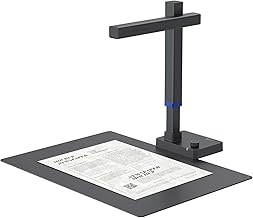
**This model is built specifically for users who need to digitize thick textbooks and lesson plans without ripping out the bindings.** Aggregate user feedback highlights its sharp 16-megapixel overhead sensor, which captures entire open spreads in a single pass while flattening curved pages digitally.
The unit connects easily via USB and utilizes built-in optical character recognition engines to export fully searchable PDF documents or editable Word files. It is an ideal tool for anyone looking to organize a personal library or build a digital archive of paper textbooks.
Flaws but not dealbreakers. Overhead camera scanners require proper ambient lighting to prevent glare on glossy paper, and the software learning curve takes a little patience during initial setup.
If you prefer a traditional automatic sheet feeder for unbound office memos instead, take a look at the Epson WorkForce ES-400 II High-Speed Color featured further down in this guide.
⚠
Lighting: Position the scanner away from direct overhead lamps to avoid glare spots on shiny book pages.
Pros
  • ✓Scans bound books without damaging spines
  • ✓Sharp 16MP resolution catches fine print
  • ✓Flattens curved pages automatically
  • ✓Exports directly to searchable PDF format
Cons
  • ✕Sensitive to heavy ambient room glare
  • ✕Takes up dedicated desk footprint space
  • ✕Software interface requires initial learning
Sensor Resolution
16 Megapixels
Connectivity
USB Interface
Max Paper Size
A3 / Ledger
Output Format
Searchable PDF
Best for: Teachers and librarians archiving fragile bound lesson material.

CZUR ET MAX Professional Book &: Best for Heavy Historical Archives

#2CZUR ET MAX Professional Book &
CZUR38MP heavy document camera
8.8OUT OF 10
OCR Accuracy9.2
Software Quality8.5
Build & Footprint8.9
Overall Value8.6
**Designed for high-end institutional work, this professional document camera uses a massive 38-megapixel sensor to pull microscopic detail out of aged paper.** Verified buyer feedback highlights its exceptional clarity when archiving fragile historical folios, blueprints, and rare ledgers.
The system features advanced page-flattening algorithms and finger-removal software to clean up scans automatically as you turn pages. It bridges the gap between industrial flatbed scanners and modern overhead optical capture.
Flaws but not dealbreakers. This hardware sits at the upper end of the pricing spectrum and requires considerable desk space for the stabilization pad and camera arm.
If you need a much smaller footprint for quick student notes instead, consider the lighter CZUR Shine Ultra Smart Portable Document model.
⚠
Sizing: Ensure you have a wide, uncluttered desk surface to accommodate the large working mat and arm.
Pros
  • ✓Stunning 38MP ultra-high resolution sensor
  • ✓Professional grade archival image clarity
  • ✓Advanced automated finger removal software
  • ✓Handles oversized historical folios easily
See also  Best Gaming Monitor: Top Picks For Smooth, Immersive Play
Cons
  • ✕Premium investment tier pricing
  • ✕Heavy and bulky physical equipment
  • ✕Overkill for basic loose paper tasks
Sensor Resolution
38 Megapixels
Connectivity
USB / Software Suite
Max Paper Size
A3 / Oversized
Output Format
Searchable PDF / TIFF
Best for: Museums, law offices, and historians digitizing rare bound volumes.

CZUR Shine Ultra Smart Portable Document: Best for Minimalist Desks and Students

#3CZUR Shine Ultra Smart Portable Document
CZURUltra-slim folding arm
8.6OUT OF 10
OCR Accuracy8.8
Software Quality8.6
Build & Footprint9.2
Overall Value8.5
**If you want a book scanner that folds completely flat into a sleek metal bar for easy backpack storage, this slim unit is worth a close look.** Verified buyer reviews emphasize how little desk space it consumes compared to traditional document cameras.
It includes smart software capable of splitting facing pages automatically and converting multi-language text into searchable PDF formats in seconds. It is a favorite choice among college students and apartment dwellers.
Flaws but not dealbreakers. The lightweight folding design lacks the heavy base weighting of bulkier studio units, meaning it can shift slightly if bumped during busy scanning sessions.
If you need heavier high-speed paper feeding without overhead camera framing, check out the Epson Workforce ES-590W Wireless & USB option instead.
⚠
Care: Fold the metal arm gently along its hinge tracks to avoid wearing out the internal USB routing cable.
Pros
  • ✓Extremely slim and lightweight folding design
  • ✓Takes up minimal desk footprint space
  • ✓Fast automatic page splitting software
  • ✓Great multi-language OCR text recognition
Cons
  • ✕Lighter body can shift if bumped
  • ✕Relies heavily on stable table placement
  • ✕Lower resolution than studio units
Design Style
Ultra-Slim Foldable
Connectivity
USB Powered
Max Paper Size
A4 Format
Output Format
Searchable PDF
Best for: Students and professionals needing a portable, folding desk scanner.

CZUR ET18 Pro Professional Document Scanner: Best for Law Firms and Bound Books

#4CZUR ET18 Pro Professional Document Scanner
CZUR18MP HD camera sensor
8.7OUT OF 10
OCR Accuracy9.0
Software Quality8.6
Build & Footprint8.7
Overall Value8.5
**Built for legal offices and corporate departments, this professional model integrates ABBYY OCR engines to convert scanned page images into fully searchable text.** Aggregate owner feedback highlights its dependable side lighting and fast capture speeds for bound books.
The unit connects easily via USB and features advanced page-flattening technology that corrects warped lines near book bindings. It eliminates the tedious need to unstitch or guillotine physical archives before scanning.
Flaws but not dealbreakers. The software requires a steady computer connection to process high-resolution images, and setup can feel complicated for casual users.
If you prefer an ultra-portable scanner for individual slips of paper instead, check out the lighter Epson Workforce ES-50 Compact & Lightweight device listed further down.
⚠
Setup: Install the official ABBYY driver suite directly from the manufacturer portal to ensure accurate OCR conversion.
Pros
  • ✓Powerful ABBYY OCR text recognition engine
  • ✓Fast capture speed for bound volumes
  • ✓Side lamps reduce harsh glare artifacts
  • ✓Auto-flattening corrects curved text lines
Cons
  • ✕Requires stable USB computer link
  • ✕Software interface has steep learning curve
  • ✕Bulky base takes up desk space
See also  Best Portable Monitor For Laptop: Top Picks For Work
Sensor Resolution
18 Megapixels
OCR Engine
ABBYY Software
Max Paper Size
A3 Ledger
Output Format
Searchable PDF
Best for: Law offices and archives digitizing thick legal ledgers.

Epson Workforce ES-50 Compact & Lightweight: Best Mobile Scanner for Travelers

#5Epson Workforce ES-50 Compact & Lightweight
EpsonWeighs under 1 lb
8.5OUT OF 10
OCR Accuracy8.6
Software Quality8.7
Build & Footprint9.4
Overall Value8.3
**For professionals who travel constantly and need to digitize receipts on the fly, this featherweight mobile scanner is an excellent companion.** Verified buyer reviews confirm it weighs under one pound and draws power directly from a connected laptop via USB.
It handles single sheets smoothly, running text recognition to generate searchable PDFs while you work on the road. It slips easily into a briefcase alongside your laptop and charging cables.
Flaws but not dealbreakers. This is a manual feed scanner, meaning you must feed each individual page by hand rather than dropping in a multi-page stack.
If you need to process large multi-page stacks automatically, take a look at the desktop Epson WorkForce ES-400 II High-Speed Color model below.
⚠
Capacity: This is a manual single-sheet feeder, so it is not built for multi-page automated document scanning batches.
Pros
  • ✓Extremely compact and lightweight mobile build
  • ✓USB bus powered without wall adapters
  • ✓Quick startup for on-the-go receipt capture
  • ✓Solid Epson OCR software bundle
Cons
  • ✕Manual single-sheet feed only
  • ✕Lacks automatic document feeder tray
  • ✕Can skew if paper is inserted crookedly
Weight
Under 1 lb
Power Source
USB Bus Powered
Feed Style
Manual Sheet-Fed
Output Format
Searchable PDF
Best for: Road warriors and field agents scanning single receipts and invoices.

Epson WorkForce ES-400 II High-Speed Color: Best ADF Workhorse for Home Offices

#6Epson WorkForce ES-400 II High-Speed Color
EpsonAutomatic duplex feeding
9.0OUT OF 10
OCR Accuracy9.2
Software Quality9.1
Build & Footprint8.9
Overall Value8.8
**Designed for home offices tackling massive stacks of loose paperwork, this automatic document feeder scanner handles dual-sided pages in a single pass.** Aggregate buyer reviews emphasize its fast processing speed and reliable paper separation mechanics that prevent multi-feed jams.
The included software processes optical character recognition automatically, turning stacks of bills and letters into searchable PDFs stored directly on your computer. It removes the friction from going paperless at home.
Flaws but not dealbreakers. This desktop unit requires a permanent physical footprint on your desk and lacks wireless networking capabilities.
If you need wireless connectivity and a large touchscreen interface instead, check out the Epson Workforce ES-590W Wireless & USB model listed below.
⚠
Maintenance: Clean the internal scanner glass rollers periodically with a lint-free cloth to maintain flawless feeding performance.
Pros
  • ✓Fast automatic duplex paper feeding
  • ✓Reliable multi-feed detection sensors
  • ✓Seamless searchable PDF conversion
  • ✓Handles mixed paper weights smoothly
Cons
  • ✕Lacks wireless network connectivity
  • ✕Requires a dedicated permanent desk spot
  • ✕USB cable connection required
Scanning Speed
High-Speed Duplex
Connectivity
USB Connection
Feeder Type
Automatic ADF
Output Format
Searchable PDF
Best for: Home office users clearing out large physical document stacks.

Epson Workforce ES-590W Wireless & USB: Best Cloud-Ready Office Hub

#7Epson Workforce ES-590W Wireless & USB
EpsonWireless with touchscreen
9.1OUT OF 10
OCR Accuracy9.3
Software Quality9.2
Build & Footprint8.9
Overall Value9.0
**Engineered for modern paperless offices, this high-speed wireless scanner features a large 4.3-inch color touchscreen and direct cloud integration.** Verified buyer reviews praise its ability to scan up to 45 pages per minute directly to network folders or cloud storage without needing a dedicated computer.
It includes a spacious 100-page automatic document feeder that chews through large stacks effortlessly while running OCR in the background to create searchable PDFs.
Flaws but not dealbreakers. This advanced network machine commands a premium price tag and takes up more desk space than basic mobile wands.
If you prefer an overhead camera style scanner for fragile bound volumes instead, take another look at our top pick, the DB8401-VIISAN Book Scanner Teachers 16MP USB.
⚠
Network: Secure your Wi-Fi pairing credentials during initial configuration to ensure stable direct cloud uploads.
Pros
  • ✓Fast 45 ppm high-speed duplex scanning
  • ✓Large 4.3-inch intuitive color touchscreen
  • ✓Direct wireless cloud and network folder uploads
  • ✓Spacious 100-page automatic document feeder
Cons
  • ✕Higher investment tier pricing
  • ✕Larger physical footprint on the desk
  • ✕Advanced network setup required
Scanning Speed
45 Pages Per Minute
Display
4.3-inch Touchscreen
ADF Capacity
100-Sheet Feeder
Connectivity
Wireless & USB
Best for: Busy offices seeking PC-free wireless cloud document archiving.

Buying Guide: OCR Engines, Feed Mechanisms, and Format Support

Choosing the right document scanner comes down to matching your physical paperwork style with the correct scanning technology. Overhead book scanners like the DB8401-VIISAN Book Scanner Teachers 16MP USB use high-resolution cameras to photograph bound pages from above, utilizing software algorithms to flatten curved lines. This approach preserves delicate bindings and historical archives that would otherwise be destroyed by traditional rotary paper paths.

See also  Best Portable Monitor: Top Picks For Work And Travel

On the other hand, traditional automatic document feeder machines like the Epson WorkForce ES-400 II High-Speed Color rely on mechanical rollers to pull loose stacks of paper past a stationary contact image sensor. According to institutional data from the National Institute of Standards and Technology, optical character recognition accuracy peaks when documents maintain high contrast and minimal skewing during feed transit. If you plan to digitize thousands of loose bills, tax forms, or office memos, an automatic feeder saves hours of manual labor compared to overhead shooting mats.

Sensor resolution also dictates how small your output text can be while remaining searchable. Models featuring 16-megapixel to 38-megapixel overhead sensors capture fine print with exceptional clarity, whereas standard desktop contact image sensors operate around optical resolutions designed specifically for standard business text. Buyers dealing with multi-language documents should verify that their included software suite supports foreign character recognition before committing to a specific hardware ecosystem.

For more guidance on setting up efficient digital workspaces, you might want to look into upgrading your setup with items like our favorite picks for top-rated brewers or organizing your desk peripherals with a reliable machine like a 5 Best USB-C Hub In 2027: Top Picks For Every Setup.

Who Should NOT Buy Best Document Scanner with OCR for Searchable PDFs

This category is the wrong purchase for a few specific types of buyers. Here's who they are, and what to look at instead.

You Only Scan Three Receipts a Month

If your primary archiving need consists of photographing an occasional grocery receipt or snapping a quick picture of a signed permission slip, dedicated scanning hardware is unnecessary. You should save your money and use a free smartphone document scanning app instead, which handles casual mobile snapshots without taking up desk space.

You Need Studio Photo Print Quality

Document scanners are engineered to maximize text legibility, OCR processing speed, and file compression rather than reproducing glossy family portraits. If your main goal involves scanning fragile photographic negatives or family photo albums, you should skip document scanners entirely and invest in a dedicated flatbed photo scanner with high optical density ranges.

Final Verdict

The best overall Best Document Scanner with OCR for Searchable PDFs is the DB8401-VIISAN Book Scanner Teachers 16MP USB, which combines a sharp 16-megapixel overhead sensor with automated book-flattening software to archive bound curricula without harming spines. Want heavy archival clarity instead? Get the CZUR ET MAX Professional Book & for its massive 38-megapixel sensor.

Need fast loose paper feeding for a busy home office? The Epson WorkForce ES-400 II High-Speed Color handles dual-sided stacks with ease. Be sure to review the Who Should NOT Buy section above before making your final purchasing decision.

FAQ

What's the best Document Scanner with OCR for Searchable PDFs overall?

The DB8401-VIISAN Book Scanner Teachers 16MP USB takes the top spot overall due to its balanced combination of high-resolution overhead capture, reliable optical character recognition, and specialized software designed to flatten bound book pages.

Do I need a computer to run these document scanners?

Most desktop models require a connected Mac or PC to process optical character recognition and save files, though advanced network units like the Epson Workforce ES-590W Wireless & USB can send searchable PDFs directly to cloud storage via touchscreen controls.

Can overhead book scanners handle glossy textbook pages?

Yes, but overhead units are sensitive to ambient room lighting. Positioning your scanner away from direct overhead lamps or overhead ceiling fixtures prevents harsh glare spots from washing out glossy text.

How does optical character recognition turn scans into searchable PDFs?

OCR software analyzes the pixel shapes in your scanned document images, matches them against known character glyphs, and embeds a hidden searchable text layer directly underneath the image file.

What is the difference between manual sheet-fed and ADF scanners?

Manual scanners like the Epson Workforce ES-50 Compact & Lightweight require you to feed each page individually by hand, whereas automatic document feeder models pull multi-page paper stacks through motorized rollers automatically.
Similar Posts

Leave a Reply

Your email address will not be published. Required fields are marked *